 Okdalto
Visualizing a Neural Network From the Ground Up
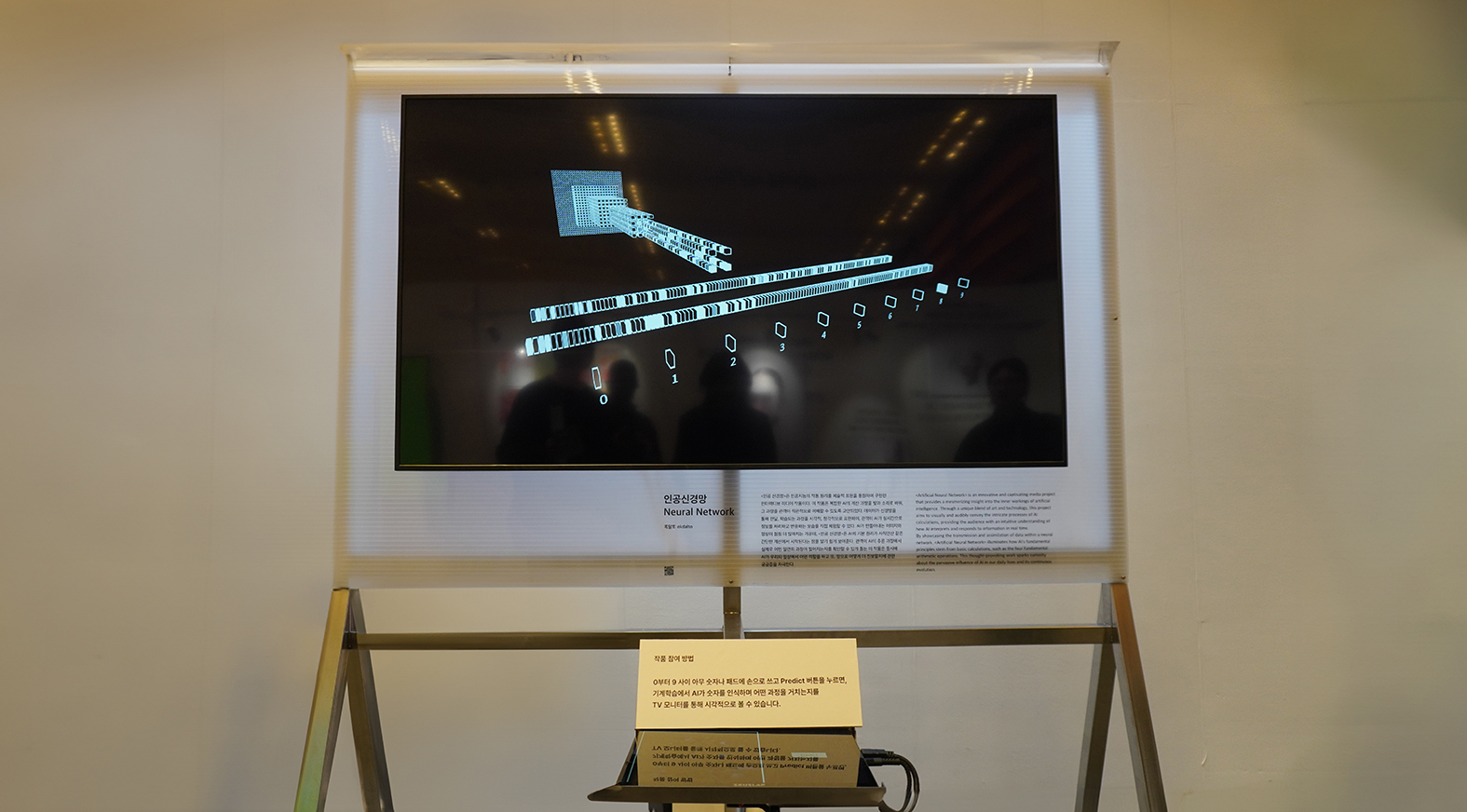
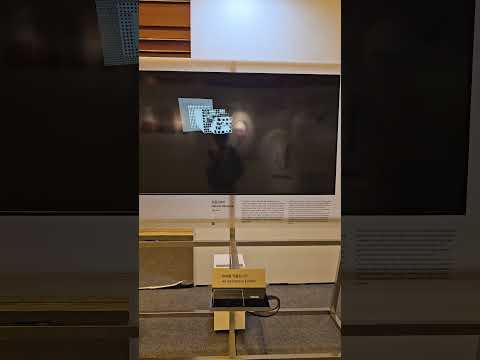
If you had to name the single hottest keyword in the world right now, it would surely be AI. Nvidia rode AI all the way to the top of the Nasdaq, the field’s pioneers are picking up Nobel Prizes, and country after country is making AI development a top national priority. Graphics cards have been reclassified as strategic materials, with sales to China restricted; the news, online forums, even my own parents talk about AI. And yet, how well do any of us actually understand it? So what is this thing, really?
This project is, in truth, an ultra-long-running one that goes all the way back to when I was first learning about AI. I got my start with a book called “Deep Learning From Scratch.” This isn’t a paid plug, but as a first book it’s genuinely excellent. It shows you how to build a neural network literally from the ground up using NumPy, and as I worked through the examples, something struck me as odd. You take some simple arithmetic, sprinkle in an even simpler activation function, and that is what we call a neural network? And this is supposed to recognize digits? It’s really this simple? I couldn’t believe it. So I set myself the goal of implementing the entire inference pipeline, starting from matrix multiplication.
First Attempt
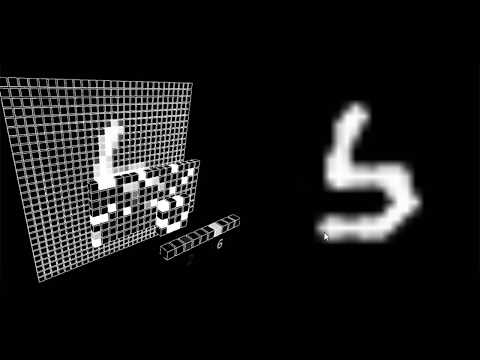
Since I had to implement everything myself, I picked the language I was most comfortable with. At the time I was using Processing the most, so I went with that. It was also easier than writing OpenGL from scratch. As I’d later find out, this choice wasn’t exactly ideal.
I did the visualization in Processing, but I wasn’t confident enough to write the training code in Java too. So I decided to just do the training in PyTorch and then port the trained parameters over to Processing.
As a first step, I built a basic network in PyTorch. I simply stacked up an MLP and trained it on the MNIST dataset, the classic first example everyone uses in deep learning. I used Binary Cross Entropy as the loss function to learn one-hot values over the ten digit classes, and I confirmed that the loss was dropping reasonably well. Next, I saved the trained weights and biases to a .txt file, then wrote code in Processing to load and parse them.
Tensor parseConvWeightsToTensor(String[] weights) {
  int outChNum = weights.length;
  int inChNum = 0;
  int kernelWNum = 0;
  int kernelHNum = 0;

  // Compute the size of each dimension
  for (int i = 0; i < outChNum; i++) {
    String[] inCh = weights[i].split("!");
    inChNum = inCh.length;
    for (int j = 0; j < inChNum; j++) {
      String[] kernelW = inCh[j].split(",");
      kernelWNum = kernelW.length;
      for (int k = 0; k < kernelWNum; k++) {
        String[] kernelH = kernelW[k].split(" ");
        kernelHNum = kernelH.length;
      }
    }
  }

  // Define the Tensor's shape and create the Tensor object
  int[] shape = {outChNum, inChNum, kernelWNum, kernelHNum};
  Tensor tensor = new Tensor(shape);

  // Store the parsed data into the Tensor
  for (int i = 0; i < outChNum; i++) {
    String[] inCh = weights[i].split("!");
    for (int j = 0; j < inChNum; j++) {
      String[] kernelW = inCh[j].split(",");
      for (int k = 0; k < kernelWNum; k++) {
        String[] kernelH = kernelW[k].split(" ");
        for (int l = 0; l < kernelHNum; l++) {
          // Set the value into the Tensor's 1D array
          tensor.set(Float.parseFloat(kernelH[l]), i, j, k, l);
        }
      }
    }
  }
  return tensor;
}
Then I wrote the basic tensor operations: matrix multiplication, the activation function, softmax, and so on. Every time I finished one, I’d keep checking that its result matched PyTorch’s. When the computational part was done (visualization aside), I felt both thrilled and amazed. Wow! So deep learning really does run on simple arithmetic plus an activation function!
  // The ReLU function is astonishingly simple.
  void _relu() {
    for (int i = 0; i < data.length; i++) {
      if (data[i] < 0) {
        data[i] = 0;
      }
    }
When you were learning arithmetic in elementary school, did you ever imagine using it to classify images of handwritten digits, generate images, or reason through a conversation? I certainly didn’t. Geoffrey Hinton, who shared a Nobel Prize in Physics for his work on AI, supposedly taught himself calculus at the age of eight. I have a memory of getting smacked by my mom in third grade because I couldn’t memorize my multiplication tables.
Alright, with the computation done, it was time to visualize. The idea was to draw each tensor as a box shaped to match its dimensions, then color each cell of the box according to its value. I also built a simple interface for drawing digits using PGraphics.
Once the visualization was finished, feeling pretty proud of myself, I pushed the code to GitHub and shared the video all over the deep learning community. This was back when deep learning was just starting to heat up, and the timing must have been right, because people really liked my visualization. Riding the high, I made a JavaScript version too and put it up on the web. It was a lot of fun.
Second Attempt
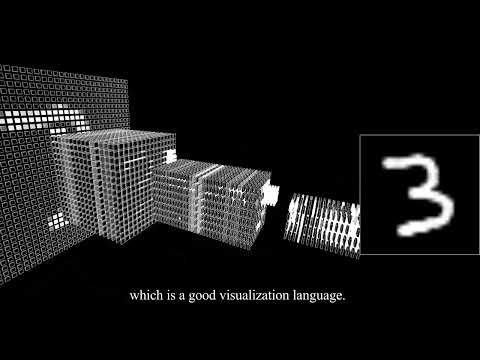
After that, for a while I couldn’t even bear to look at the code. But the more I thought about it, the more flaws I noticed. I’d originally built and visualized the network as an MLP, and that had some problems. Because the shape of real data differs from digits drawn on a computer, the inference accuracy suffered a bit. I hadn’t done any augmentation during training either, and that seemed to hurt performance too.
To fix this, I decided not to rely on an MLP alone but to add a convolutional module. I also threw in some heavy augmentation during training, including affine transformations. Once training was done, this time I wrote a function to load the trained convolution filters and biases. I implemented the convolution operation as well. There were plenty of confusing parts, but I confirmed it behaved exactly like PyTorch, and I was overjoyed.
Next I tackled visualizing the convolution. This is where things got tricky. How do you even visualize a convolution? It wasn’t enough to just show the filter. I had to show the process. So I added animation. The crux of visualizing convolution was to show how the filter slides across the input image and what operation it performs at each position, and then to show where the computed value lands in the next layer. It made my head hurt and the code got really messy, but in the end I pulled it off.
Once I’d built that, I wanted to visualize reshape and the MLP’s inner workings too. When data that has passed through the convolution layers gets flattened and handed off to the fully connected layer, a reshape happens. After that comes the MLP. The MLP’s weights are multiplied against the flattened tensor one row at a time. Each weight in a row is multiplied with the corresponding element of the input tensor, all the products are summed, and the result passes through the activation function to become one cell of the next layer. I visualized this entire process too.
Final Attempt
Just as I thought the visualization was complete, it turned out there were far too many boxes to draw. The problem with Processing is that drawing a single box consumes a single draw call. When you have that many draw calls, rendering crawls along painfully slowly. So I had no choice but to use instancing. Instancing is a technique that lets the GPU render the same mesh repeatedly when you’re drawing many copies of the same object, instead of issuing a separate draw call for each one. With it, you can draw thousands of boxes efficiently. Processing’s default rendering processes draw calls individually on the CPU, which limits how many objects you can handle, but instancing solves that problem.
Since Processing on its own makes it hard to reach OpenGL’s low-level features directly, I had to tap into OpenGL libraries from within Processing to use its instancing functionality. To do this, I hacked into Processing and used GLSL together with the PJOGL library.
To send the boxes’ position, size, and color data to the GPU, I had to implement, step by step, the process of creating OpenGL VBOs and binding them to the GPU. I also had to rewrite the shaders. First I wrote a vertex shader to take in each box’s instance data. This shader was responsible for computing the appropriate on-screen coordinates based on each box’s position and size. Then I wrote a fragment shader, which determined the box’s color and ultimately displayed it on screen. Once you go with custom shaders like this, you can no longer use stroke. So I wrote a shader that draws an outline by simply extruding along the normal, and using backface culling I rendered the outline first and then drew the box on top of it.
After that grueling process, drawing thousands of boxes was no longer a matter of firing off thousands of draw calls as before, but a structure where it all gets handled in a single call. With OpenGL’s glDrawArraysInstanced command I could render all the boxes at once, and as a result the GPU’s parallel processing power could handle the large-scale data that Processing couldn’t cope with. Hooray!
  // The draw function inside the TensorVisualizer class
  void draw() {
    //for (Box box : boxes) {
    //  box.draw();
    //}
    for (int i = 0; i < boxes.length; i++) {
      this.offsets[i * 3 + 0] = boxes[i].curPos.x;
      this.offsets[i * 3 + 1] = boxes[i].curPos.y;
      this.offsets[i * 3 + 2] = boxes[i].curPos.z;

      this.colors[i * 4 + 0] = boxes[i].curVal.x;
      this.colors[i * 4 + 1] = boxes[i].curVal.y;
      this.colors[i * 4 + 2] = boxes[i].curVal.z;
      this.colors[i * 4 + 3] = boxes[i].isVisible ? 1.0f : 0.0f;


      this.sizes[i * 3 + 0] = boxes[i].curSize.x;
      this.sizes[i * 3 + 1] = boxes[i].curSize.y;
      this.sizes[i * 3 + 2] = boxes[i].curSize.z;
    }
    // Bind the buffer to load the boxes.
    bindBuffers();
    // draw call with instancing applied
    gl.glDrawElementsInstanced(GL.GL_TRIANGLES, boxGL.indices.length, GL.GL_UNSIGNED_INT, 0, offsets.length/3);
    // Unbind the buffer. Not strictly necessary, but just to be safe!
    unbindBuffers();
  }
Honestly, by the time I’d gotten this far, I started thinking how much easier it would have been to just do it all in Python with OpenGL from the start. If I ever, ever do this work again, I’d want to use PyOpenGL.
There was one nice thing about using Processing, though: its OSC library is made to be incredibly easy to use. Come to think of it, the camera library and the sound playback library were convenient too. I built another program that lets you draw a picture and send it over OSC, and I set things up so that information could flow back and forth between the network visualization program and the OSC program through a wired router. I also added a bit of SFX.
Ta-da! And so the exhibition opened at Design Korea 2024. I’d started building it to teach myself, but later on the motivation became wanting to show off, to stand next to people who don’t know the first thing about AI yet call themselves “AI artists” on the strength of their output alone, and go: this is real AI, lol. But watching people’s reactions at the exhibition, I’d thought I’d made it easy enough to follow, yet most people seemed to understand absolutely nothing, convolution or otherwise. If I ever touch this again, I figured I really need to make it genuinely easy to understand.
Conclusion
The conclusion is that a network is a big deal, and also no big deal at all. These days I keep running into people who are far too optimistic about AI and people who are far too pessimistic. Honestly, neither camp impresses me. AI is great, but there’s still plenty it can’t do. Barring physical disabilities, humans usually learn to walk around the age of one. And yet, walking or going up and down stairs as naturally and flexibly as a human is still a challenge for AI. The same goes for natural hand movements. They’re really, really hard to pull off.
That said, it’s also true that AI accomplishes some staggering things. AI is not magic. And yet it does magical things. The GPUs that handle most AI computation are made from semiconductors. Semiconductors are made from silicon extracted from sand. In other words, when you talk to GPT, you’re essentially talking to sand. Isn’t that a premise straight out of a fantasy novel? Isaac Asimov, the godfather of science fiction, said that “any sufficiently advanced magic is indistinguishable from technology.”
There are surely many reasons opinions split to such extremes, but my personal view is that this kind of extremism springs from ignorance. With this work, I wanted to show how AI really works. Its underlying principle is incredibly simple. But I also wanted to show how those simple principles come together to form an intricate process, and what that process becomes capable of doing. That’s part of why I’m releasing the code, too. See for yourself!
And besides, does there have to be a purpose? I had fun the whole time I worked on this, and that’s enough.
You can find the full source code for the piece here.
Comments