 Okdalto
GLSL Volumetric Rendering (The Rigorous, Harder Version)
- For the gentler, easier version, see here.
How We Represent Objects: Polygon and Voxel Representation
To render an object, we first have to decide how to represent it. The most common approach is representation using polygons.
This approach is effective for defining the shape of an object, but it is poorly suited to representing volumetric objects, for the following reasons.
-
Polygon rendering mostly defines the outer boundary of an object; it cannot express interior density or changes of state. A structure whose interior is not uniform, such as a cloud or smoke, is therefore difficult to represent properly with polygons.
-
To represent complex shapes like clouds or smoke with polygons, you would need to generate an enormous number of polygons, which sharply increases both computational cost and memory usage. As a result, realistic representation becomes inefficient and limited.
-
Polygon rendering works on the basis of the interaction between light and a surface. A volumetric object, however, involves complex interactions in which light passes through its interior and is absorbed, scattered, and refracted. Simulating such processes with polygons runs into fundamental limitations.
Polygons, however, are not the only kind of representation. Many representations exist, including voxels, splats, SDFs, and neural volumes. Volume rendering can also use any of several representations, but in this example we will use a voxel representation.
“Voxel” is a portmanteau of “volume” and “pixel,” and it refers to a grid structure in 3D space. Think of Minecraft. Each voxel carries physical properties (e.g., density, color, transparency), which makes it well suited to representing the complex internal state of an object. Building on this representation, let us look at how to compute and visualize the way all the data in space interacts with light.
 A variety of shape representations. Clockwise from top-left: SDF, Voxel, Polygon, Splat.
Ray Integration
Light emitted from a source travels through 3D space as a ray and interacts with the medium. This process is computed through an equation called ray integration. It was first introduced by James T. Kajiya in his 1984 Siggraph paper, Ray Tracing Volume Densities. Ray integration computes the color and brightness (energy) accumulated as light passes through the interior of an object, accounting for the medium’s absorption, scattering, and emission effects.
Ray integration is defined as follows.
\[C(t) = \int_{t_{near}}^{t_{far}} T(t) \cdot \sigma(t) \cdot c(t) \, dt\]The meaning of each variable and function is as follows.
$C(t)$: the final color or brightness (energy) of the ray. This is the result of the ray integration, indicating how much the light passing through the medium has accumulated.
$\sigma(t)$: the sum of absorption and scattering.
$c(t)$: the medium’s intrinsic color and intensity information. It represents the color and brightness that the medium possesses at a given point and contributes to the ray integration.
$t_{near}$, $t_{far}$: the start and end points where the ray intersects the medium. The ray integration is carried out from $t_{near}$, the point where the emitted light first meets the medium, to $t_{far}$, the point where it finishes passing through.
$T(t)$ is the transmittance, which describes how much the intensity of the light is attenuated as it passes through the object. It is defined as follows.
\[T(t) = \exp\left(-\int_{t_{\text{near}}}^{t} \sigma(s) \, ds\right)\]This is a generalized form of the Beer-Lambert Law. Light carries energy. As light passes through a medium (a volume), this energy is absorbed or scattered. The part describing absorption is Beer’s law. If you look closely at the equation, you’ll see that it expresses how much of the light survives, as a function of the accumulated extinction coefficient, when light has traveled from $t_{\text{near}}$ to ${t}$.
Ray Marching
Obtaining an analytic solution to the ray integration is essentially impossible. Our goal is to render a plausible-looking result in real time, even if it is not physically exact, so we will approximate the integral above with a Riemann sum. The Riemann-sum approximation of ray integration was first introduced by Nelson Max in his 1995 paper Optical Models for Direct Volume Rendering.
As an equation, it is written as follows.
\[C(t) \approx \Delta t \sum_{k=0}^{M-1} T(t_k) \cdot \sigma(t_k) \cdot c(t_k)\]Here $\Delta t = \frac{t_{\text{far}} - t_{\text{near}}}{M}$ is the sampling interval, $t_k = t_{\text{near}} + k \cdot \Delta t$ is the $k$-th sampling point, and $M$ is the number of discretized samples.
Likewise, $T(t)$ can also be approximated with a Riemann sum.
\[T(t) \approx \exp\left(-\Delta s \sum_{i=1}^{k} \sigma\left(t_{\text{near}} + (i - 1)\Delta s\right)\right)\]Here $\Delta s = \frac{t - t_{\text{near}}}{k}$.
Now that we have the Riemann sum, we will implement it using the ray marching technique. As the name suggests, you can picture ray marching as a ray starting from the camera and “marching” into the scene a fixed step at a time. The ray that leaves the camera samples 3D space at regular intervals and accumulates the medium’s properties. In this process, the density and color values at each point are summed up to ultimately determine the color of the pixel.
NeRF
As an aside, if you look into the NeRF paper you’ll find that the very same ray integration equation appears there. That’s because NeRF, too, is still doing volume rendering; it has merely replaced the volume-sampling function with a neural network.
 The ray integration that appears in the NeRF paper
Scattering
Light scatters as it passes through a medium. There are many types of scattering, but the ones we can easily observe in nature are Rayleigh scattering and Mie scattering.
Rayleigh scattering occurs as light passes through very small particles, such as air molecules. The reason the sky is blue is precisely this Rayleigh scattering: blue light, with its short wavelength, scatters easily, and that scattered light is what reaches our eyes. In the evening, on the other hand, as the sun moves closer to the horizon its light travels a longer distance; now the longer-wavelength light scatters more, and red light dominates. In a single word, this phenomenon is the sunset glow.
Unlike Rayleigh scattering, Mie scattering is caused by larger particles (e.g., dust, smoke, clouds). This kind of scattering scatters light of all wavelengths regardless of wavelength, which is why clouds and one’s breath in cold air appear white.
The Contribution of External Light (Direct Lighting)
There is one thing we left out of the ray integration: the contribution of external light. The color of an object is the combined result of the object’s own color and the color of external light. When computing an object’s color, then, we must take both into account.
If we factor in external lighting, the ray integration can be written as follows.
\[C(t) = \int_{t_{\text{near}}}^{t_{\text{far}}} T(t) \cdot \sigma(t) \cdot \left[c(t) + L_{\text{ext}}(t)\right] \, dt\]In general, to express $L_{\text{ext}}$ we have to consider light coming in from every direction, as follows.
\[L_{\text{ext}}(t) = \int_{\Omega} T(t) \cdot I(\omega) \cdot p(\omega, t) \, d\omega\]This, however, is very expensive to compute, so we will consider just a single direction ($\omega$). Expressed as a Riemann sum, this is
\[L_{\text{ext}}(t) \approx \Delta s \cdot \sum_{k=0}^{M-1} T(s_k) \cdot \sigma(s_k) \cdot I(\omega_d) \cdot p(\omega_d, s_k)\]and the meaning of each variable is as follows.
$M$: the number of samples
$\Delta s$: the sample interval
$s_k$: the sampling point
$T(s_k)$: the transmittance
$\sigma(s_k)$: the sum of absorption and scattering.
$I(\omega_d)$: the intensity of the light coming from direction $\omega_d$
$p(\omega_d, s_k)$: the phase function, representing the probability that light scatters toward $\omega_d$ at the sample point $s_k$
In fact, this is almost identical to computing $C(t)$ without external lighting, save only for the phase function.
Phase Function
The phase function is a function that describes, from the observer’s viewpoint, the degree to which light is scattered by particles into a particular direction. Since we are dealing with Mie scattering inside a cloud volume, we will use the Mie scattering phase function. It describes how the intensity of light is distributed depending on the angle at which incoming light is scattered; specifically, it depends on the angle $\theta$ between the incident direction and the scattering direction. Inside a volume like a cloud, light is scattered many times by particles such as water droplets, and in this process the phase function determines the relative proportions of forward scattering and backward scattering. Forward scattering refers to the phenomenon in which, even after light interacts with a particle, it continues traveling in a direction close to its original heading. This is a key characteristic in media like clouds; when the droplets are larger than the wavelength of the light, forward scattering tends to dominate. When forward scattering occurs, light travels through the medium at relatively small scattering angles, which contributes to making the cloud look comparatively transparent and to producing the bright halo effect around the sun.
Backward scattering, by contrast, is the phenomenon in which, after interacting with a particle, light is reflected or strongly refracted back in the direction opposite to its original heading. It occurs relatively rarely, and is observed when light fails to pass through the cloud and is turned back. Backward scattering contributes to softening, visually, the cloud’s opacity and the scattered path of the light.
The Mie scattering phase function is especially sensitive to particle size and the wavelength of light, and in media containing relatively large particles, like clouds, it exhibits a tendency toward dominant forward scattering. The phase function thus plays an important role in accurately modeling the interaction between light and particles, and so in determining the optical properties and visual characteristics inside a cloud. The catch is that the Mie scattering phase function is very expensive to compute. For this reason, the Mie scattering phase function is generally approximated using the Henyey-Greenstein phase function.
The Henyey-Greenstein phase function is defined as follows.
\[p(\cos\theta) = \frac{1}{4\pi} \cdot \frac{1 - g^2}{(1 + g^2 - 2g\cos\theta)^{3/2}}\]Here $g$ is a parameter representing the relative proportion of forward to backward scattering.
When $g = 0$, the scattering is isotropic, scattering uniformly in all directions.
When $g > 0$, forward scattering dominates.
Conversely, when $g < 0$, backward scattering can be considered dominant.

The Mie scattering phase function in the red-wavelength region ($λ=0.65 μm$). It looks complicated at a glance, and indeed it is.
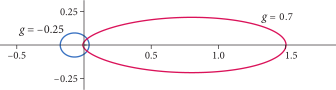
The Henyey-Greenstein phase function for various values of the parameter $g$. At a glance it looks far simpler, and indeed it is.
Implementing Volumetric Rendering
What follows is an example of volume rendering implemented in GLSL, based on everything described above. You can see how this code behaves on Shadertoy.
 The Shadertoy example
#define FOWARD 0.8 // forward scattering coefficient
#define BACKWARD -0.2 // backward scattering coefficient
#define RAY_ITER 120 // number of ray marching iterations
#define LIGHT_ITER 16 // number of lighting sample iterations
#define LIGHT_ATTEN 64.0 // light attenuation coefficient
#define RAY_STEP_SIZE 0.01 // ray marching step size

// function for rotating about an axis
void rotate(inout vec3 z, vec3 axis, float angle) {
    float s = sin(angle);
    float c = cos(angle);
    // compute the rotation matrix for the axis rotation
    mat3 rot = mat3(
        c + axis.x * axis.x * (1.0 - c),       axis.x * axis.y * (1.0 - c) - axis.z * s, axis.x * axis.z * (1.0 - c) + axis.y * s,
        axis.y * axis.x * (1.0 - c) + axis.z * s, c + axis.y * axis.y * (1.0 - c),       axis.y * axis.z * (1.0 - c) - axis.x * s,
        axis.z * axis.x * (1.0 - c) - axis.y * s, axis.z * axis.y * (1.0 - c) + axis.x * s, c + axis.z * axis.z * (1.0 - c)
    );
    z = rot * z; // apply the rotation to the vector
}

// function that computes a procedural fractal shape
float fractal(vec3 p) {
    for (int i = 0; i < 8; i++) {
        // fractal that rotates over time
        rotate(p, vec3(1.0, 0.0, 0.0), iTime * 0.2);
        rotate(p, vec3(0.0, 1.0, 0.0), iTime * 0.1);
        // reflective symmetry
        if (p.x + p.y < 0.0) p.xy = -p.yx;
        if (p.y + p.z < 0.0) p.yz = -p.zy;
        if (p.z + p.x < 0.0) p.zx = -p.xz;
        p -= 0.06; // scale down and translate
    }
    return length(p) - 0.15; // compute the final distance
}

// use the fractal as the SDF (distance function)
float sdf(vec3 p) {
    return fractal(p);
}

// Henyey-Greenstein Phase Function
float HenyeyGreenstein(float sundotrd, float g) {
    float gg = g * g;
    return (1. - gg) / pow(1. + gg - 2. * g * sundotrd, 1.5);
}

// compute scattering (mix of forward and backward scattering)
float getScattering(float sundotrd) {
    return mix(HenyeyGreenstein(sundotrd, FOWARD), HenyeyGreenstein(sundotrd, BACKWARD), 0.5);
}

// density sampling (procedural density generation)
float sampleDensity(vec3 p) {
    return pow(max(-sdf(p), 0.0), 1.3) * 10.0; // SDF-based density with amplification
}

// compute the light position along a Lissajous curve
vec3 lightPosLissajous(float t) {
    float A = 1.5;  // amplitude on the x axis
    float B = 1.2;  // amplitude on the y axis
    float C = 1.1;  // amplitude on the z axis
    float a = 3.1;  // frequency on the x axis
    float b = 2.2;  // frequency on the y axis
    float c = 4.3;  // frequency on the z axis
    float delta = 0.2; // phase difference

    float x = A * sin(a * t + delta);
    float y = B * sin(b * t);
    float z = C * sin(c * t);

    return vec3(x, y, z); // return the dynamic light position
}

// main rendering function
void mainImage(out vec4 fragColor, in vec2 fragCoord) {
    // normalized pixel coordinates [-1, 1]
    vec2 uv = fragCoord / iResolution.xy;
    uv = (uv - 0.5) * 2.0;

    vec3 col = vec3(0.0); // initial color value

    vec3 camPos = vec3(0.0, 0.0, -2.0); // camera position
    vec3 rayPos = camPos; // ray start point
    vec3 rayDir = normalize(vec3(uv, 0.0) - camPos); // ray direction
    float time = iTime * 0.2; // dynamic time
    vec3 lightPos = lightPosLissajous(time); // compute the light position

    float transmittance = 1.0; // initial transmittance

    rayPos += rayDir; // start advancing the ray
    for (int i = 0; i < RAY_ITER; i++) {
        rayPos += rayDir * RAY_STEP_SIZE; // advance the ray
        float density = sampleDensity(rayPos); // compute the density at the current position
        if (density <= 0.0) {
            continue; // skip to the next iteration if there is no density
        }
        vec3 lightDir = lightPos - rayPos; // light direction
        float lightDistance = length(lightDir); // light distance
        lightDir = lightDir / lightDistance; // normalize to a unit vector
        float lightStep = lightDistance / float(LIGHT_ITER); // lighting step size
        float sundotrd = dot(rayDir, -lightDir); // dot product of the ray and light directions
        float scattering = getScattering(sundotrd); // compute scattering
        vec3 lightRayPos = rayPos; // ray position used for shadow computation
        float shadowDensity = 0.0; // initialize the shadow density
        for (int j = 0; j < LIGHT_ITER; j++) {
            shadowDensity += sampleDensity(lightRayPos) * lightStep; // accumulate the shadow density
            lightRayPos += lightDir * lightStep; // advance along the light direction
        }
        vec3 externalLight = vec3(exp(-shadowDensity * LIGHT_ATTEN) * scattering); // compute the external light
        col += transmittance * externalLight * density; // accumulated color
        transmittance *= exp(-density * RAY_STEP_SIZE * LIGHT_ATTEN); // update the transmittance
        if (transmittance < 0.01) break; // terminate early if the transmittance is low
    }

    col = pow(col, vec3(1.0 / 2.2)); // gamma correction
    fragColor = vec4(col, 1.0); // output the final color
}
If you were to implement it in TouchDesigner, it would look like this.
#define FOWARD 0.8 // forward scattering coefficient
#define BACKWARD -0.2 // backward scattering coefficient
#define RAY_ITER 120 // number of ray marching iterations
#define LIGHT_ITER 16 // number of lighting sample iterations
#define LIGHT_ATTEN 64.0 // light attenuation coefficient
#define RAY_STEP_SIZE 0.01 // ray marching step size

uniform float iTime;

out vec4 fragColor;

// function for rotating about an axis
void rotate(inout vec3 z, vec3 axis, float angle) {
    float s = sin(angle);
    float c = cos(angle);
    // compute the rotation matrix for the axis rotation
    mat3 rot = mat3(
        c + axis.x * axis.x * (1.0 - c),       axis.x * axis.y * (1.0 - c) - axis.z * s, axis.x * axis.z * (1.0 - c) + axis.y * s,
        axis.y * axis.x * (1.0 - c) + axis.z * s, c + axis.y * axis.y * (1.0 - c),       axis.y * axis.z * (1.0 - c) - axis.x * s,
        axis.z * axis.x * (1.0 - c) - axis.y * s, axis.z * axis.y * (1.0 - c) + axis.x * s, c + axis.z * axis.z * (1.0 - c)
    );
    z = rot * z; // apply the rotation to the vector
}

// function that computes a procedural fractal shape
float fractal(vec3 p) {
    for (int i = 0; i < 8; i++) {
        // fractal that rotates over time
        rotate(p, vec3(1.0, 0.0, 0.0), iTime * 0.2);
        rotate(p, vec3(0.0, 1.0, 0.0), iTime * 0.1);
        // reflective symmetry
        if (p.x + p.y < 0.0) p.xy = -p.yx;
        if (p.y + p.z < 0.0) p.yz = -p.zy;
        if (p.z + p.x < 0.0) p.zx = -p.xz;
        p -= 0.06; // scale down and translate
    }
    return length(p) - 0.15; // compute the final distance
}

// use the fractal as the SDF (distance function)
float sdf(vec3 p) {
    return fractal(p);
}

// Henyey-Greenstein Phase Function
float HenyeyGreenstein(float sundotrd, float g) {
    float gg = g * g;
    return (1. - gg) / pow(1. + gg - 2. * g * sundotrd, 1.5);
}

// compute scattering (mix of forward and backward scattering)
float getScattering(float sundotrd) {
    return mix(HenyeyGreenstein(sundotrd, FOWARD), HenyeyGreenstein(sundotrd, BACKWARD), 0.5);
}

// density sampling (procedural density generation)
float sampleDensity(vec3 p) {
    return pow(max(-sdf(p), 0.0), 1.3) * 10.0; // SDF-based density with amplification
}

// compute the light position along a Lissajous curve
vec3 lightPosLissajous(float t) {
    float A = 1.5;  // amplitude on the x axis
    float B = 1.2;  // amplitude on the y axis
    float C = 1.1;  // amplitude on the z axis
    float a = 3.1;  // frequency on the x axis
    float b = 2.2;  // frequency on the y axis
    float c = 4.3;  // frequency on the z axis
    float delta = 0.2; // phase difference

    float x = A * sin(a * t + delta);
    float y = B * sin(b * t);
    float z = C * sin(c * t);

    return vec3(x, y, z); // return the dynamic light position
}

// main rendering function
void main() {
    // normalized pixel coordinates [-1, 1]
    uv = (vUV.st - 0.5) * 2.0;

    vec3 col = vec3(0.0); // initial color value

    vec3 camPos = vec3(0.0, 0.0, -2.0); // camera position
    vec3 rayPos = camPos; // ray start point
    vec3 rayDir = normalize(vec3(uv, 0.0) - camPos); // ray direction
    float time = iTime * 0.2; // dynamic time
    vec3 lightPos = lightPosLissajous(time); // compute the light position

    float transmittance = 1.0; // initial transmittance

    rayPos += rayDir; // start advancing the ray
    for (int i = 0; i < RAY_ITER; i++) {
        rayPos += rayDir * RAY_STEP_SIZE; // advance the ray
        float density = sampleDensity(rayPos); // compute the density at the current position
        if (density <= 0.0) {
            continue; // skip to the next iteration if there is no density
        }
        vec3 lightDir = lightPos - rayPos; // light direction
        float lightDistance = length(lightDir); // light distance
        lightDir = lightDir / lightDistance; // normalize to a unit vector
        float lightStep = lightDistance / float(LIGHT_ITER); // lighting step size
        float sundotrd = dot(rayDir, -lightDir); // dot product of the ray and light directions
        float scattering = getScattering(sundotrd); // compute scattering
        vec3 lightRayPos = rayPos; // ray position used for shadow computation
        float shadowDensity = 0.0; // initialize the shadow density
        for (int j = 0; j < LIGHT_ITER; j++) {
            shadowDensity += sampleDensity(lightRayPos) * lightStep; // accumulate the shadow density
            lightRayPos += lightDir * lightStep; // advance along the light direction
        }
        vec3 externalLight = vec3(exp(-shadowDensity * LIGHT_ATTEN) * scattering); // compute the external light
        col += transmittance * externalLight * density; // accumulated color
        transmittance *= exp(-density * RAY_STEP_SIZE * LIGHT_ATTEN); // update the transmittance
        if (transmittance < 0.01) break; // terminate early if the transmittance is low
    }

    col = pow(col, vec3(1.0 / 2.2)); // gamma correction
    fragColor = TDOutputSwizzle(vec4(col, 1.0));
}
Comments